Gefeliciteerd! Je hebt je account succesvol ingesteld en de Smart11-app geïnstalleerd. Nu is het tijd om je prestaties te analyseren en je impact op het veld te vergroten. Deze handleiding helpt je het analyseproces in Smart11 te begrijpen.
De wedstrijdbeelden streamen #
Open de Smart11-app en ga naar je dashboard om je meest recente wedstrijd te zien. Voor toegang tot al je wedstrijden, navigeer je naar "Wedstrijden" in het in-app menu.
Klik op de wedstrijdtitel of de knop "Wedstrijdoverzicht" om naar het wedstrijdoverzicht te gaan. Hier vind je alle informatie over je wedstrijd, inclusief de video. Als dit de eerste keer is dat je deze wedstrijd analyseert, zie je dat er nog geen acties zijn geselecteerd of geanalyseerd.
Klik op de videospeler of de knop "Selecteer jouw acties" om de wedstrijd te starten.
Je acties selecteren #
Bekijk je prestaties nauwkeurig en wanneer je jezelf een van je ontwikkelpunten ziet uitvoeren, tik je op het bovenste rechtergedeelte van het scherm. Dit opent de "Selecteer jouw actie"-overlay. Hier kun je klikken op de actie die je zojuist hebt uitgevoerd.
Je hebt nu twee opties:
- Klik op "Selecteer" (aanbevolen): Dit slaat je actie op en gaat verder met de rest van de wedstrijdvideo. Nadat je alle acties hebt geselecteerd, kun je ze in één keer achter elkaar analyseren.
- Klik op "Analyseer nu": Dit opent het analysevenster en stelt je vragen over je actie. Na het volledig analyseren van deze actie keer je terug naar de volledige wedstrijd.
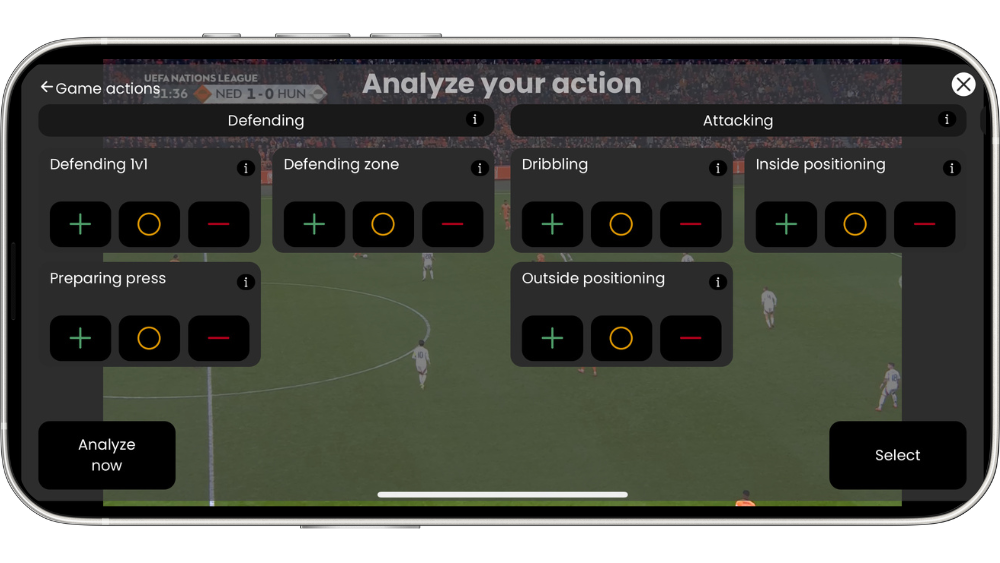
Bekijk de hele wedstrijd en selecteer alle acties die overeenkomen met je ontwikkelpunten.
Tip: De videospeler heeft slimme functies om je analyse sneller te maken. Lees alles over het gebruiken van de videospeler in deze handleiding!
Je acties analyseren #
Na het selecteren van al je acties in de wedstrijd, kun je ze in detail analyseren om de inzichten te krijgen die je nodig hebt om je impact te vergroten. In het wedstrijdoverzicht klik je op "Start analyse" om naar het analysecentrum te gaan.
Hier zie je alle acties die je hebt geselecteerd voor verdere analyse, gesorteerd op game action. Klik op de game action waarmee je wilt beginnen en klik op de eerste clip of "Start analyse" om de clip te openen.
Bekijk de clip en beantwoord de vragen in de app over je actie. Al je antwoorden worden opgeslagen en verwerkt tot gedetailleerde statistieken, die je helpen om concrete inzichten te krijgen over hoe je kunt verbeteren in dit ontwikkelpunt.
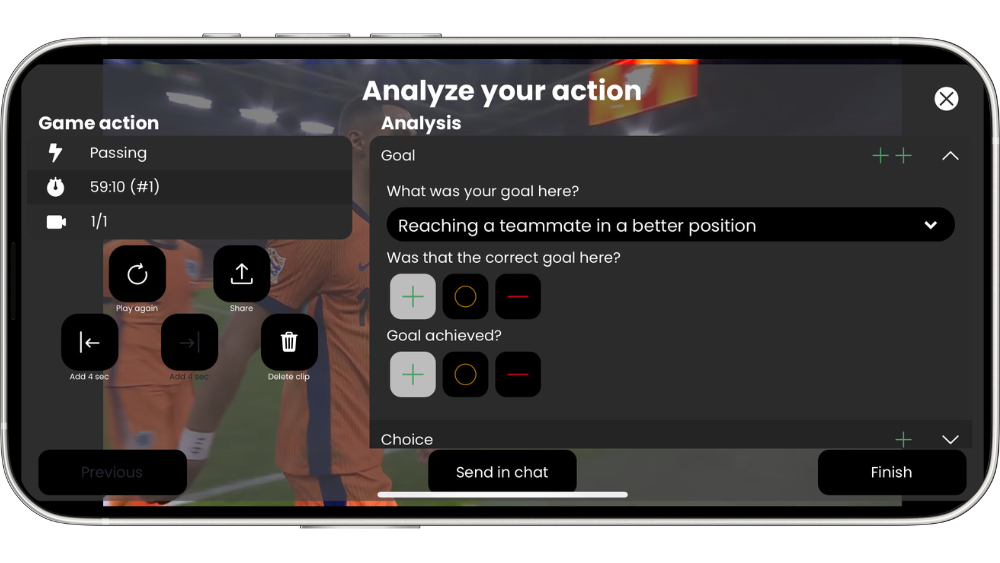
Match report #
Na het voltooien van de analyse is je wedstrijdrapport beschikbaar. In het wedstrijdrapport vind je een overzicht van je prestaties en kun je je statistieken bijhouden.